Déclic · Guides · VPN & security
Review
Proton Pass review: what the free plan includes and how safe it is

Ad: this page contains affiliate links. If you buy or sign up through them, Déclic earns a commission at no extra cost to you. Our opinions are our own.
In brief
Proton Pass is a password manager from the Swiss company behind Proton Mail. Its pricing page (October 2026) lists a free plan with unlimited logins, notes and cards on unlimited devices, a password generator, passkey support and ten email aliases. The built-in authenticator, wider sharing and dark web monitoring need a paid plan. Proton says the apps are open source and end-to-end encrypted, and it publishes audits by two security firms, Cure53 in 2023 and Recurity Labs in 2026. No password manager is risk-free: the UK's National Cyber Security Centre says to protect the account with two-step verification, to use a strong primary password and to prefer passkeys where they are offered.
Who it suits: people who want a free, cross-device password manager with passkeys and email aliases, and who value an open-source, audited design. Who it does not suit: households that need to share many vaults with many people without paying, or anyone who wants a built-in authenticator for free.
Visit Proton Pass ↗ Affiliate link
Is Proton Pass free?
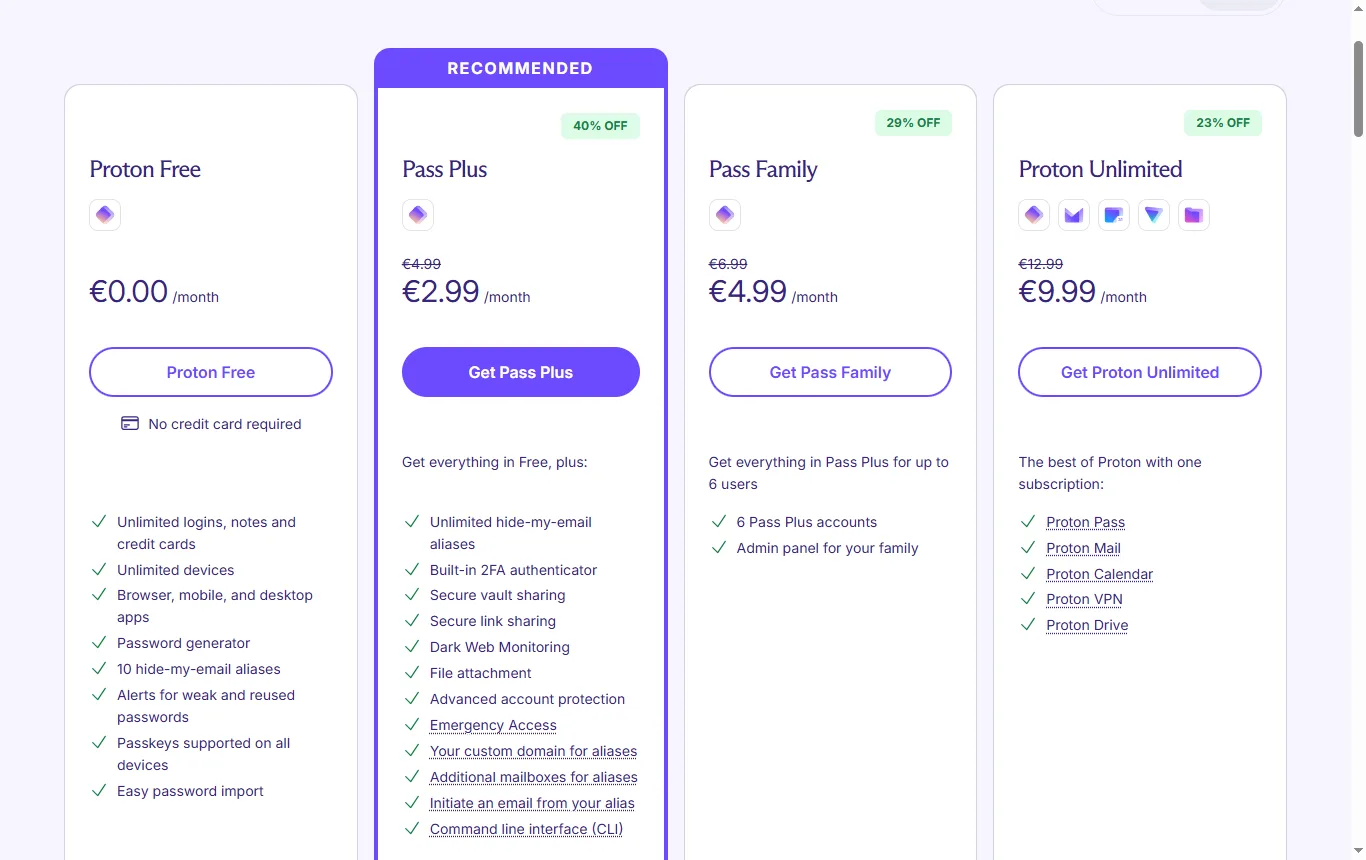
Yes, there is a free plan. The pricing page (proton.me/pass/pricing, October 2026) names four plans: Proton Free, Pass Plus, Pass Family and Proton Unlimited. No prices are copied here. Proton Free is listed as including:
- unlimited logins, notes and credit cards;
- unlimited devices, with browser, mobile and desktop apps;
- a password generator;
- ten "hide-my-email" aliases;
- alerts for weak and reused passwords;
- passkey support on all devices;
- easy password import;
- limited vault organisation (two vaults) and sharing (with two other people).
The page says the built-in two-factor authenticator is a paid feature. Proton Unlimited bundles Pass with other Proton services (Mail, Calendar, VPN and Drive), and Pass Family includes Pass Plus for up to six users and adds an admin panel. Paid plans come with a 30-day money-back guarantee.
What do you only get by paying?
Pass Plus and above add, according to the same page: unlimited aliases, the built-in authenticator, secure vault sharing, secure link sharing, Dark Web Monitoring, file attachments, an advanced account-protection service, Emergency Access, a custom domain for aliases, extra alias mailboxes, sending email from an alias and a command-line interface.
Whether any of these matter is a personal call. A single person who uses a separate authenticator app and does not share passwords may never need them. A family or a small team probably will. The free plan is genuinely free and even allows limited sharing: two vaults that can be shared with two other people, which can cover a household Wi-Fi password. What it does not give you is the wider sharing, the authenticator or the monitoring that a bigger household or a small team tends to want.
Which profile needs which plan?
| Profile | Does the free plan cover it? | What to look at |
|---|---|---|
| One person, several devices | Usually, thanks to unlimited logins and devices | Whether you want the built-in authenticator or only passkeys |
| Couple sharing a few logins | Often, with two shared vaults for two other people | How many logins you want to share, and whether both can recover the account |
| Family of up to six | Probably not on its own | Pass Family is listed for up to six users with an admin panel |
| Freelancer or small team | Rarely | Sharing, Emergency Access, custom alias domain and a command-line interface sit in paid plans |
| Someone who uses many aliases | Ten aliases are free | Unlimited aliases and sending from an alias are paid |
Is there a lifetime Proton Pass subscription?
The pricing page (October 2026) shows monthly and annual billing for its plans and no lifetime option. If you see a "lifetime" deal elsewhere, read who is selling it and what it covers, and compare it with the official page before paying.
How does Proton Pass compare with NordPass?
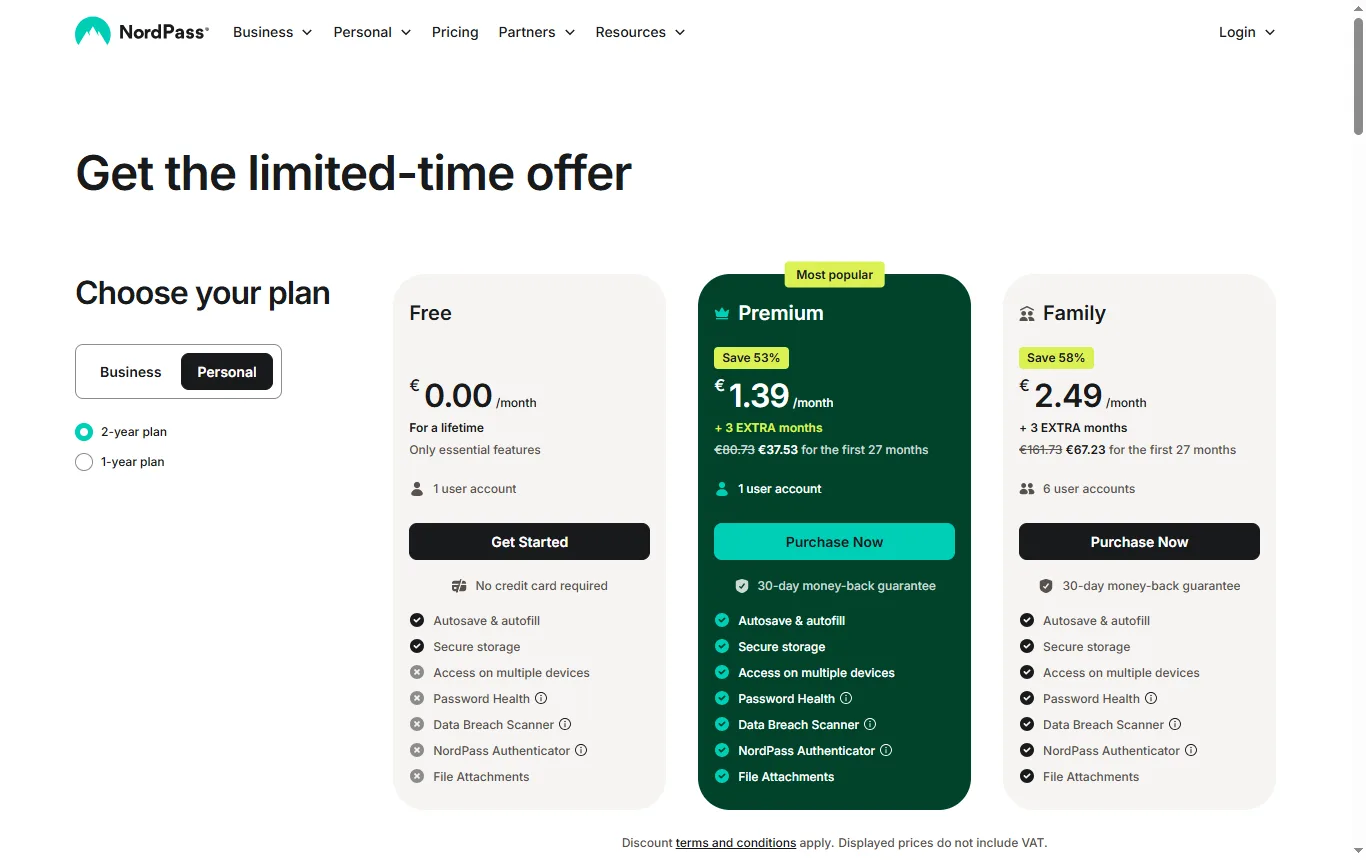
NordPass is also in our catalogue, from the publisher of NordVPN. Its plans page (October 2026) lists a free plan for one user, limited to the essentials: autosave and autofill, and secure storage. Features listed as not included in the free plan are multi-device access, the password health check, the data breach scanner, the authenticator and file attachments. Premium and Family plans come with a 30-day money-back guarantee. Passkey handling by plan is not specified in the table, and plan details change often, so read the page again on the day you decide.
| Point | Proton Pass free plan | NordPass free plan |
|---|---|---|
| Devices | Unlimited, with browser, mobile and desktop apps | Multi-device access not included |
| Stored items | Unlimited logins, notes and cards | Essentials: autosave, autofill, secure storage |
| Passkeys | Supported on all devices | Not specified in the plan table |
| Built-in authenticator | Paid feature | Not included |
| Breach or dark web checks | Dark Web Monitoring is paid | Data breach scanner not included |
| File attachments | Paid feature | Not included |
| Money-back guarantee | 30 days on paid plans | 30 days on Premium and Family |
On the points above the free plans are not alike: one is built around unlimited devices, the other around a single-device essentials plan. Which one fits depends on how many devices you use every day. Audits and security pages for NordPass are best looked up on its own site, using the checklist further down.
Is Proton Pass safe?
Proton's claims, from the Proton Pass page and its security page (October 2026):
- Data is protected with end-to-end encryption, and Proton says it cannot decrypt your vault.
- Each vault uses a random 32-byte key and data is encrypted with 256-bit AES-GCM.
- Usernames, web addresses and note contents are encrypted too, so Proton cannot see them.
- The apps are open source, and the site cites independent audits and a public bug bounty.
- Proton AG is a Swiss company based in Geneva, and Swiss jurisdiction applies. The security page does not say where data is hosted.
These are statements by the vendor. They describe how the product is designed, which is what you can check, and the sections below look at the outside checks.
What do the Proton Pass audits say?
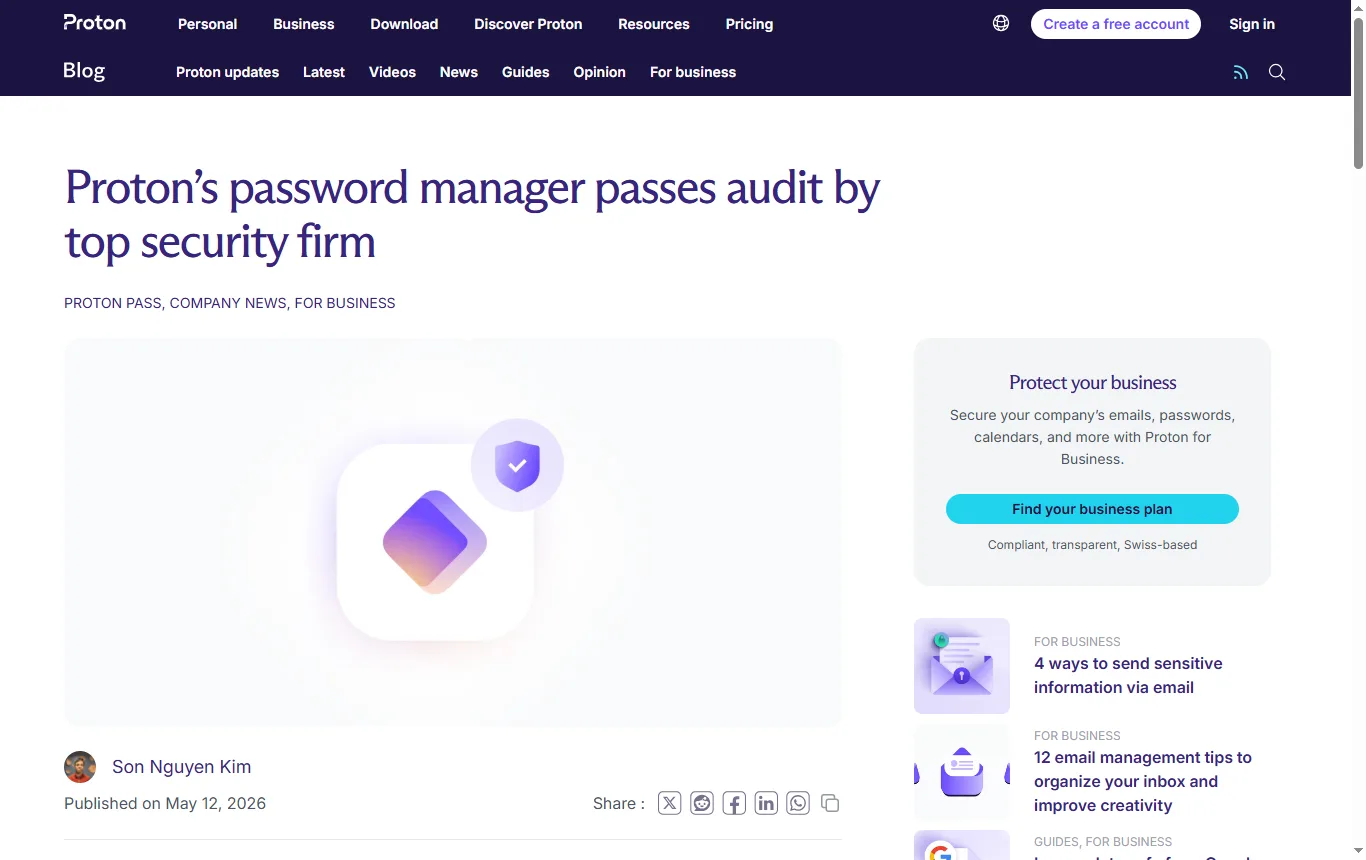
Proton publishes two audits of Proton Pass on its own blog.
Recurity Labs, 2026. Proton's post, published on 12 May 2026, says Recurity Labs, an ISO 27001-certified consultancy with no financial ties to Proton, tested the browser extensions, the mobile and desktop apps and the command-line interface between January and April 2026. It reports an overall security posture rated "well above par", no remote exploits and no encryption bypass. The report's observations were mainly recommendations about how secrets are handled in a computer's memory while the app runs, and Proton says the desktop memory-handling issues were resolved during the retest.
Cure53, 2023. The earlier post, published on 19 July 2023, says Cure53 audited the mobile apps, browser extensions and API in May and June 2023, found a moderate number of mostly low-severity issues and described the overall security as "commendable". Proton says every reported issue has been fixed except one medium-severity item that it says cannot be resolved because of an Android limitation. The report is published.
What audits can and cannot tell you: they check a version of the software at a moment in time, they were commissioned by the vendor, and they do not prove that nothing could go wrong later. They are still more informative than a vendor simply saying it is secure. Look for the date of the latest audit and the scope, as you would for any app that holds your logins.
What does the NCSC say about password managers?
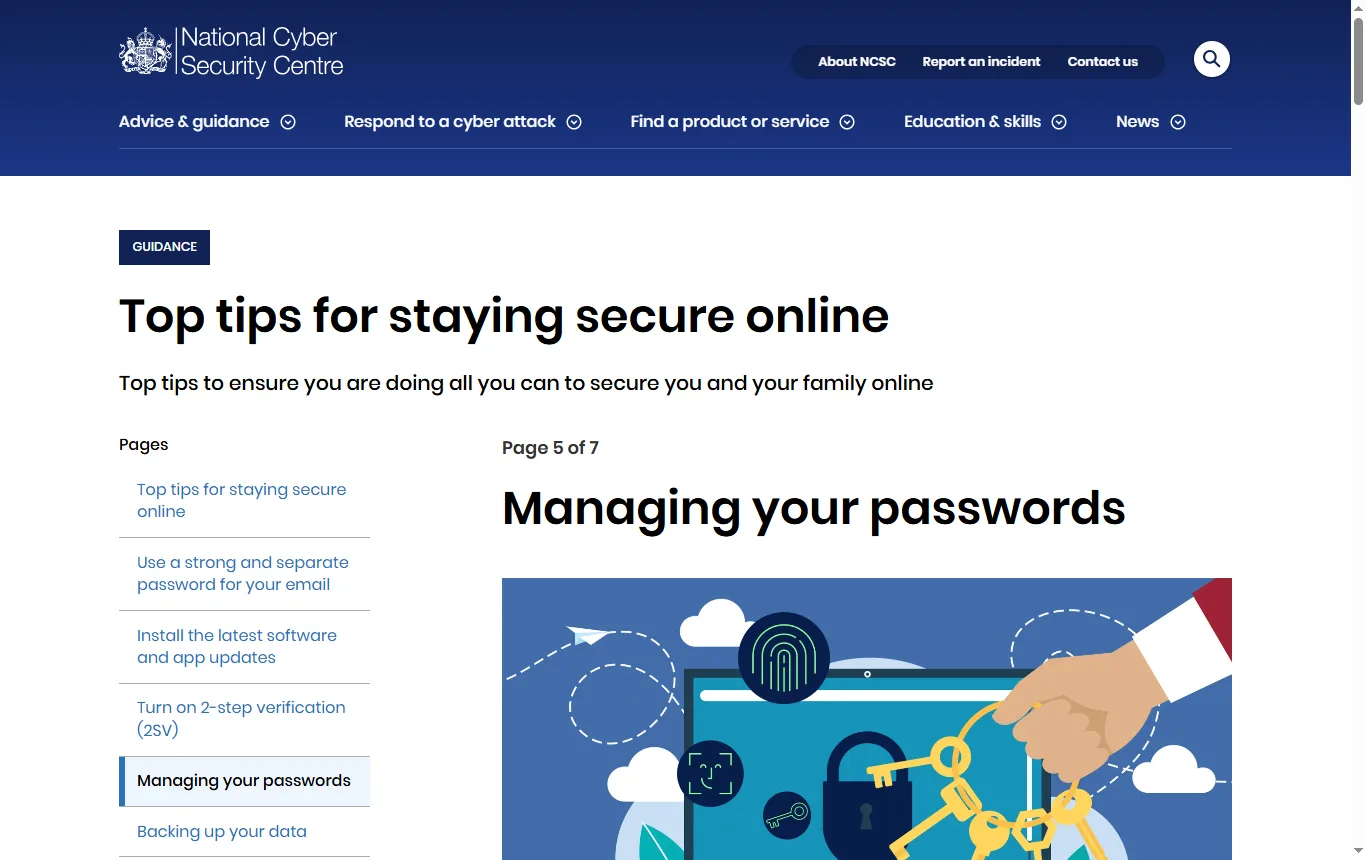
The UK's National Cyber Security Centre has a page called "Managing your passwords" (reviewed 21 May 2026). Its main points:
- A password manager stores passwords safely so that you can use a different one for each account without memorising them.
- The primary (master) password is the key to the manager, so you must be able to remember it; recovery options differ by product.
- Turn on two-step verification for the password manager account too, so a stolen primary password is not enough.
- Browser-based managers are fine on your own devices but should never be used on a shared public device.
- Third-party managers are useful if you use mixed devices and browsers. When choosing, consider cross-device support, password generation options, whether you want to pay, and extras such as breach alerts. The best choice is the one that meets your needs and that you find easiest to use.
- Passkeys are the NCSC's first choice for logging in wherever they are offered; otherwise use a strong, unique password with two-step verification.
Proton Pass offers passkey support on the free plan. If you adopt it, the sensible set-up is a strong primary password you can remember, two-step verification on your Proton account and a recovery method written down and kept somewhere safe. Before relying on any recovery option, read Proton's support documentation to see exactly what it can and cannot restore.
How do you move to a password manager without locking yourself out?
A change of manager is a good moment to tidy up, and a few habits avoid most problems.
- Create the account first and set a strong primary password. Choose something you can remember without writing it on the device itself.
- Turn on two-step verification straight away, as the NCSC advises, and store the recovery method away from your phone.
- Import your existing passwords. Proton's page lists easy import as a free feature. Delete any exported file once the import has worked, because it holds your passwords in readable form.
- Start with the accounts that matter most: email, banking, mobile and broadband providers, and your main shopping accounts. Replace weak or reused passwords there first.
- Switch on passkeys where a site offers them, since the NCSC puts them first.
- Test on a second device before you remove passwords from your browser, so that you know the sync works.
- Keep a written note of where the recovery information lives, for you and for someone you trust.
If you travel, the accounts worth protecting first include airline and booking sites; our Trip.com review → looks at one such booking platform.
What do users say about Proton, and what is missing?
Trustpilot has no separate profile for Proton Pass. Its page for Proton as a whole (October 2026) shows 2.2 out of 5 from 1,817 reviews, with 57% one-star reviews and 27% five-star, and an AI summary that lists slow, automated support, unexpected account lockouts and difficult account recovery as recurring complaints, alongside praise for the interface, privacy options and cross-device experience. These reviews cover several Proton products and only a few mention Pass, so they are not a verdict on the password manager. They do suggest taking account recovery seriously: store your recovery method and keep an exported backup if the app offers one, in a safe place.
Which is the safest free password manager?
No single name fits every situation. "Safest" depends on the design, the audits, the company's track record, how you set up your account and your own habits, such as a weak primary password or no two-step verification. Compare the same checklist for each candidate:
- Is the encryption end-to-end, and does the vendor explain what it can and cannot see?
- Is the code open to inspection?
- Who audited it, when, and what was in scope?
- What does the free plan cover, and what is paid?
- Does it support passkeys and two-step verification?
- What happens if you forget your primary password?
Our broader guide compares the choices side by side: see the best password manager guide →. If you also use a VPN, the same logic of checking audits and terms applies, as in our NordVPN review →.
What are the downsides of using a password manager?
- A single point of failure: if the primary password is lost and the vendor cannot decrypt your vault, recovery may be impossible. Plan for it.
- A target for attackers, which is why two-step verification on the manager is essential.
- Phishing: a manager that fills in logins can help you spot fake sites, but only if you pay attention to the address.
- Switching costs: importing and cleaning old passwords takes an evening.
- Extras can be paywalled. See the comparison above.
"Which password managers have never been hacked?" has no honest answer, because no vendor can promise it. Judge instead how a vendor handles security: audits, transparency and the speed of its fixes.
Not sure? Tell us how many devices and people need passwords
Frequently asked questions
Is Proton Pass free?
Yes, with limits. The free plan covers unlimited logins on unlimited devices, passkeys and ten aliases, while the authenticator, wider sharing and dark web monitoring are paid.
Is Proton Pass safe?
Proton says it uses end-to-end encryption and open-source apps, and it publishes audits by Cure53 (2023) and Recurity Labs (2026). Protect your account with a strong primary password and two-step verification.
Which is the safest free password manager?
No single name fits everyone. Compare encryption design, audits, free-plan limits, passkey support and recovery options.
Is Proton Pass better than a browser password manager?
The NCSC says browser managers are fine on your own devices and simplest if you stay in one browser or system, while third-party managers help across mixed devices. The choice depends on your devices.
What happens if I forget my Proton Pass password?
Because the encryption depends on your secret password, recovery options matter. Read Proton's support documentation before you rely on it, and keep a recovery method somewhere safe.
Is there a lifetime Proton Pass plan?
The pricing page lists monthly and annual billing and no lifetime option.
See also
 ReviewShopify pricing in the UK: plans, fees, VAT and what to checkHow Shopify pricing works for UK sellers: plans, free trial, payment fees, VAT, HMRC reporting and a simple way to work out your real monthly cost.
 ReviewBrevo review: free plan limits, pricing model and UK email rulesBrevo reviewed from its pricing page, ICO guidance and Trustpilot UK: free plan limits, how the pricing works and the UK rules for email marketing.