Déclic · Guides · AI video & voice
Comparison
Best AI video generator: Kling, InVideo, DeeVid and PixVerse
Ad: this page contains affiliate links. If you sign up through them, Déclic earns a commission at no extra cost to you. Our opinions are our own.
In brief
There is no single best AI video generator, because the tools differ on what they make (a realistic clip, a finished video with voice and music, an animated photo), on what the free tier allows, and on what you are allowed to do with the result. Free access is best understood as a way to try the tool: a small number of credits, a watermark on exports and, in most cases, no commercial use until you pay. Pick the tool by the job you need done, run the same short prompt in two of them, and read the rights terms before you publish anything.
Who it suits: creators, small businesses and curious beginners who want short AI-made clips and are willing to compare free tiers before paying. Who it does not suit: anyone who needs guaranteed commercial rights, broadcast quality or a specific look from the first attempt without iterating.
Which AI video generator is the best for your job?
| Tool | Best for | Free access, from the official pages (October 2026) | Check before you pay |
|---|---|---|---|
| Kling AI | Realistic shots from text or an image | Free credits claimed each month on login, amount not displayed; watermark and commercial use reserved for paid members | Credits per clip, written permission for commercial use, the "Kling AI" mention |
| InVideo AI | A finished video (scenes, voice, music) from an idea or script | No free plan on the pricing page | Credits that do not roll over, export quality, refund rules |
| DeeVid AI | Animating a photo or a text prompt into a short clip | 20 free credits on registration, about four videos, with a watermark | Resolution by plan, wording of the commercial licence |
| PixVerse | Short clips and trending effects from an image or text | 60 credits at the start, then 30 a day, up to 540P, with a watermark | Cost in credits per clip, no watermark only on paid plans |
The "best for" column describes what each publisher positions the tool for. It is a description of intent, not a ranking of results. The free access column is the most fragile, because credits and plans change often. Interfaces are in English or localised to a varying degree; check that the prompt box works well in your language before you commit credits.
How should you choose between AI video generators?
Five criteria do most of the work.
- What you need to produce. A single realistic shot, an explainer with narration and music, or a photo brought to life are three different jobs.
- What the free tier gives you. Count credits against the cost of a clip, and note whether exports carry a watermark.
- Resolution and length. A free clip in low resolution is a preview, not a deliverable.
- Rights. Who owns the output, what the publisher may do with your uploads, and whether commercial use is allowed on your plan.
- Cancellation and refunds. Subscriptions renew automatically, and refund rules are often stricter once you have used the service.
A sixth point is practical: the cost of a clip in credits is usually shown inside the generation tool rather than on the pricing page. Generate one short clip and note the balance before and after, so that you know what a project will really cost.
What should you know about Kling AI before signing up?
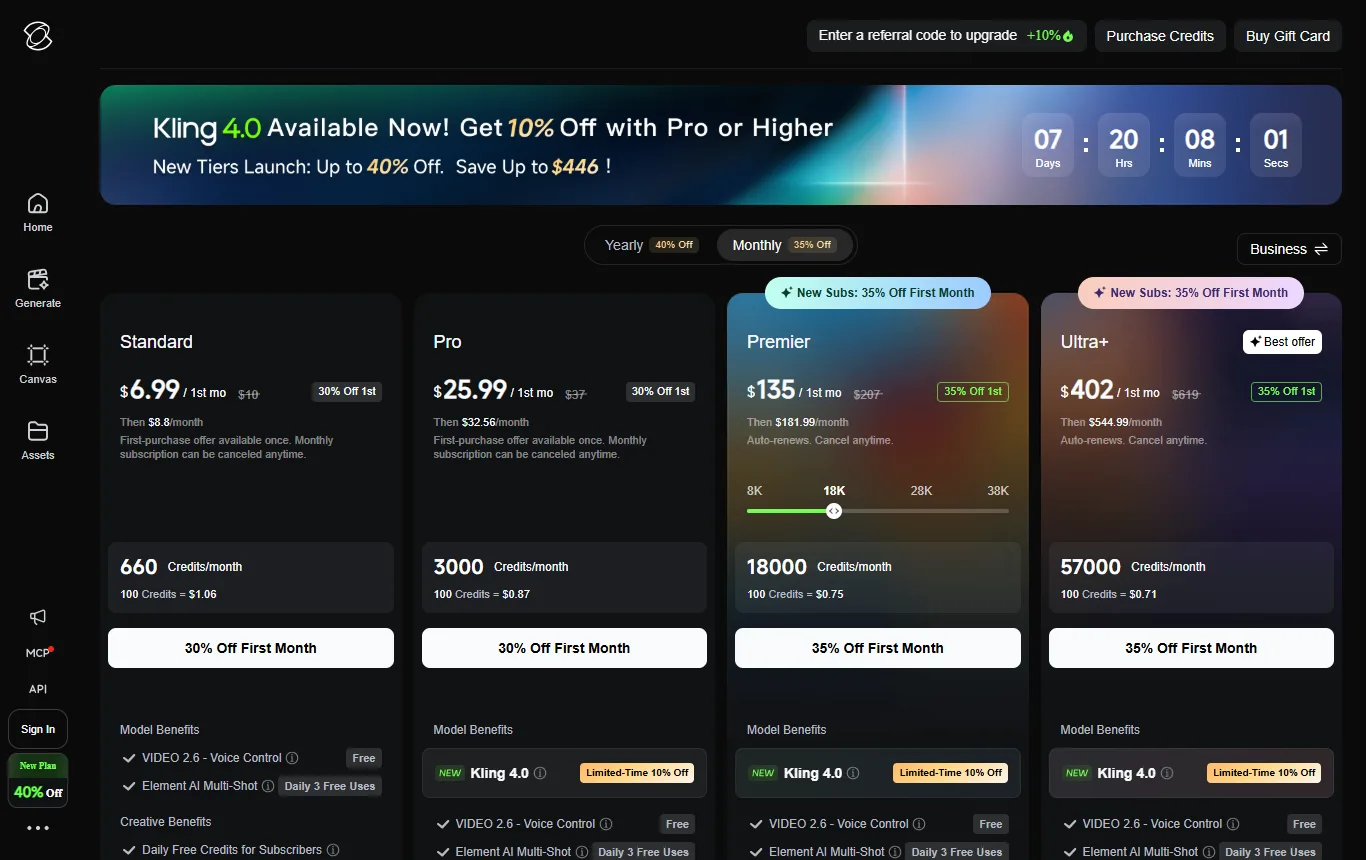
Kling's membership page shows a free "Basic" entry at no charge. People who are not subscribers claim free credits once a month when they sign in, and those credits stay valid for 31 days. The amount is not displayed publicly, so figures quoted on blogs cannot be checked against the publisher. Daily bonus credits are reserved for subscribers, and so are watermark removal and commercial use, which start with the Standard plan. Credits bought separately last two years, while monthly subscription credits last 31 days.
The terms of service (kling.ai/docs/user-policy, updated April 2026) matter as much as the credit count:
- Ownership (section 4.4). You hold the intellectual property rights in your content under applicable law, and Kling does not claim ownership.
- Mention of Kling (section 4.5). Without written authorisation, when you use or share generated content you must show the "Kling AI" brand or state visibly that the output was generated by Kling AI.
- Commercial use (section 4.6). Without written authorisation, you cannot use, reproduce, distribute or modify the output for commercial purposes. Paid plans have their own terms, which are separate from these.
- Licence to Kling (section 4.7). You grant a non-exclusive, royalty-free licence to host, reproduce, modify for display, create derivative works from and distribute your inputs and outputs. Kling may use content for promotion, to improve its features and to research new ones, and you can withdraw the authorisation by emailing its support address.
- Your own use of outputs (section 3.1). You may not use outputs to train AI models of your own.
Disputes go to arbitration in Singapore under Singapore law. Best for people who want realistic motion from text or an image and are prepared to check how credits are spent. Limits: a free tier that is a sample, a licence over your uploads, and a "Kling AI" mention to display unless you have written permission. Our guide to the Kling AI free tier → goes through these points in more detail.
What should you know about InVideo AI before signing up?
InVideo's pricing page lists the plans Starter, Plus and Max, and mentions an Enterprise plan with no detail. It does not describe a free plan or a free trial, and an offer that appears only after you create an account cannot be judged from the outside. It says credits are used for creation rather than for downloading, that unused credits do not roll over to the next month, and that Plus and Max include free guest seats with 190 credits each. 4K export is listed from Starter. It sends licensing questions to the terms in its footer.
Refunds are the part to read. InVideo's help centre says you can ask for a refund within seven days of buying or renewing, but only if the subscription has not been used. It counts as used as soon as a video or an element has been generated or downloaded in the billing period, and used subscriptions are not refundable. You ask by email to the support address, an approved refund is processed at once and can take five to ten working days to show, and a subscription bought through Apple's App Store is refunded by Apple. You can cancel at any time and the plan stays active until the end of the cycle.
That makes InVideo the odd one out in this list: if you want a free tier to experiment with, the pricing page does not offer one. Best for people who want to turn a script or an idea into a finished video with voice and music rather than a single clip, and who are ready to look at a paid plan. Limits: no documented free plan, credits that expire monthly, a refund that disappears once you generate anything, and commercial terms you must read elsewhere.

What should you know about DeeVid AI before signing up?
DeeVid's pricing page lists three plans, Lite, Pro and Premium. New users get 20 free credits on registration, described as roughly four videos. Lite gives 200 credits a month (about 40 videos or 100 images), Pro 600 and Premium 3,300, which implies roughly five credits for a video on the publisher's own estimates. Lite outputs at 720P, Pro and Premium at 1080P. Videos made on the free tier carry a watermark that disappears once you subscribe.
The page says commercial use is allowed, including advertising and social-media marketing, subject to the terms of service. It describes the paid plans, though, and is silent on commercial rights for watermarked free videos, so assume nothing for free exports and read the terms. All plans renew automatically and can be cancelled at any time, with cancellation taking effect at the end of the cycle.
Best for people who mainly want to animate photos or turn a short prompt into a clip without video-editing skills. Limits: a small one-off credit allowance, a watermark on free exports and the need to confirm what the licence says for free output. If photos are your starting point, animating a photo with AI for free → gives a step-by-step method.

What should you know about PixVerse before signing up?
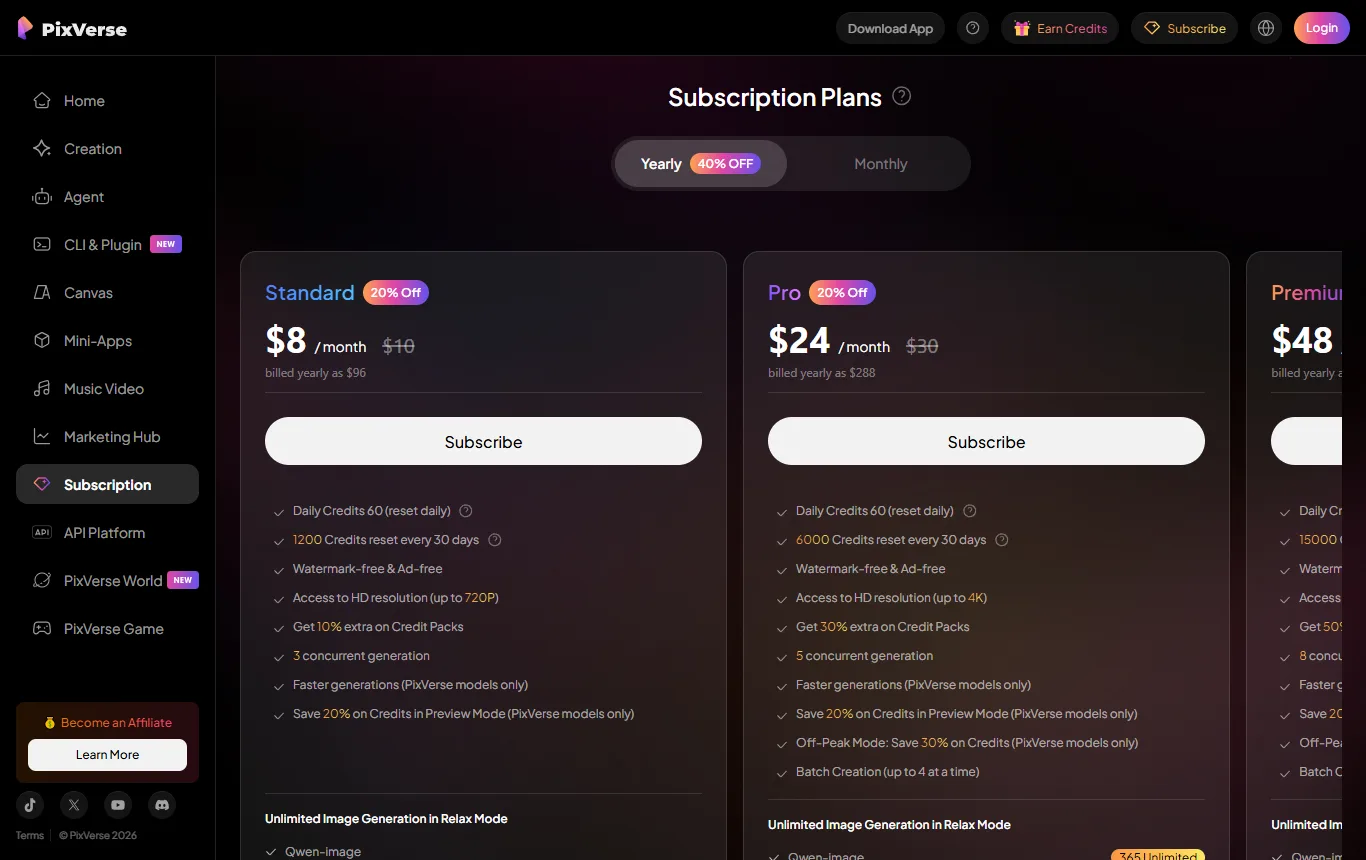
PixVerse's subscription page (app.pixverse.ai/subscribe) is readable without an account. Its free "Basic" plan gives 60 credits at the start and 30 credits a day, renewed daily at midnight UTC and lost if unused, with video up to 540P and a watermark. Paid plans add 60 credits a day plus between 1,200 and 25,000 subscription credits per 30-day cycle, and they are the only ones that remove the watermark. Unused subscription credits expire at the next cycle; only bonus credits from purchases or events never expire. Some blogs quote "90 credits and 60 a day" for the free plan; the official page shows the lower figures, and the 60 a day belong to paid plans.
The cost in credits of one clip is not on the pricing page, so you cannot yet say how many videos 30 daily credits buy. Credit packs are not refundable, and only unused, running subscriptions can be refunded. Best for short, playful clips with effects from an image or a prompt. Limits: a watermark and 540P on the free plan, and no statement about commercial use of free exports.
Which tool fits which kind of user?
| If you are... | Start with | Why |
|---|---|---|
| A hobbyist who wants to try realistic motion | Kling AI | A free monthly allowance exists, though the amount is not shown |
| A small business owner who wants a finished promo with voice | InVideo AI | Built for whole videos, but you need to look at a paid plan |
| Someone animating family or product photos | DeeVid AI | A clear 20-credit start and a published resolution by plan |
| A social-media creator who likes quick effects | PixVerse | A daily free allowance that you can spread over several days |
Nothing in this table is a score. It is a starting point to be replaced by your own two-prompt comparison.
Is there any 100% free AI video generator?
The documented offers are trials, not free use that is also unlimited, watermark-free and cleared for commercial use: a one-off block of credits on sign-up for DeeVid, a monthly allowance for Kling, a start balance plus a daily allowance for PixVerse, and no free plan on InVideo's pricing page. Be wary of any site that promises unlimited free videos with no watermark, and of "modded" apps, which are not an official route and could expose your device or your account.
The honest answer is that "free" means "enough to find out whether the tool does what you want". Plan on spending credits on two or three test prompts rather than on a finished project.
Which is the most realistic AI video?
There is no standard measure. Realism depends on the subject (a landscape is easier than a person speaking), the prompt, the model version and the number of attempts. Publisher claims and social-media samples are selected examples. The quickest fair comparison is one you can repeat yourself:
- Write one prompt of two sentences, with a clear subject and camera movement.
- Run it once in each of two tools on the same day, using the free credits.
- Compare hands, faces, text on screen and how objects move between frames.
- Save the results with the prompt so you can repeat the test after the next model update.
That test costs a few credits and tells you more than any ranking written by someone else.
Can ChatGPT make AI video?
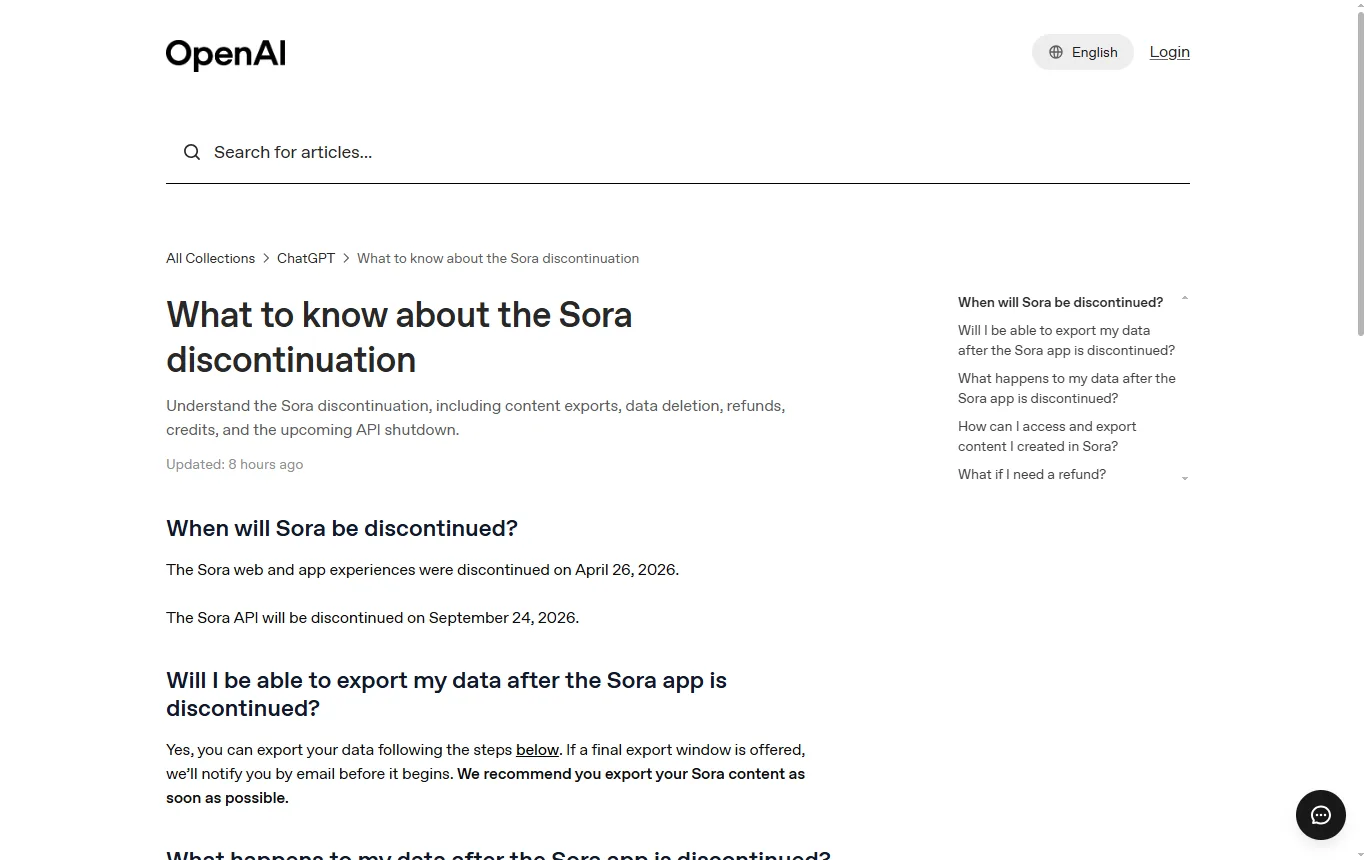
Sora, OpenAI's video product, has been discontinued. OpenAI's help page on the Sora discontinuation says the app and the website were shut down on 26 April 2026 and that the API was due to close on 24 September 2026, a date that has now passed. Content can be exported, and purchased credits remain usable for Codex. That page does not describe video generation inside ChatGPT, so check OpenAI's current help pages for what is offered today and treat older articles with suspicion.
Is it illegal to use AI to make videos in the UK?
Making a video with AI is not illegal in itself. The law attaches to what the video shows and how you use it. Four points are worth knowing.
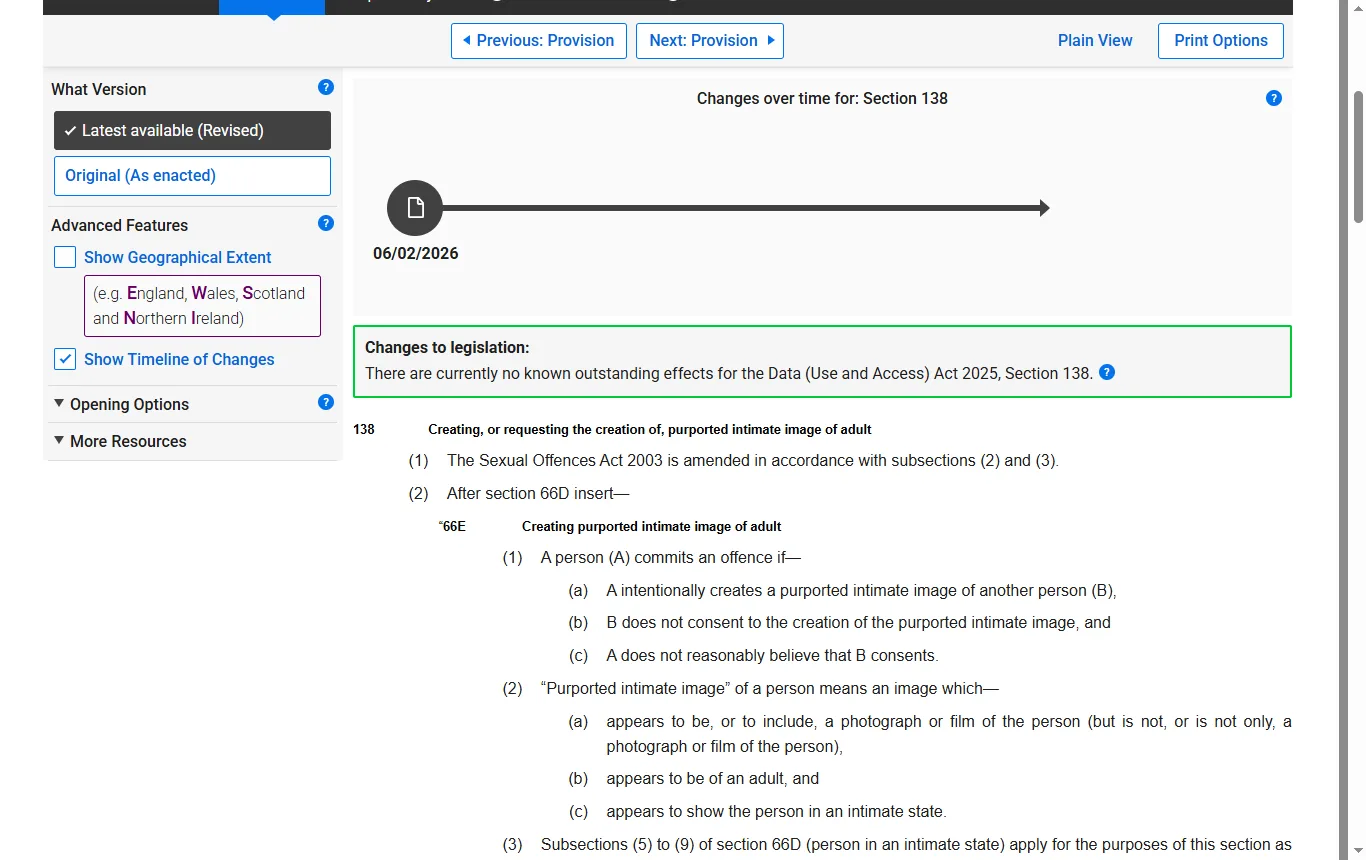
- Intimate deepfakes. Section 138 of the Data (Use and Access) Act 2025 inserted offences into the Sexual Offences Act 2003 for intentionally creating, or requesting the creation of, a purported intimate image of an adult without consent and without reasonable belief in consent (legislation.gov.uk). The section came into force on 6 February 2026 according to the same page. This is a criminal offence, so do not use these tools for anything of the kind.
- Platform rules. YouTube's help page on altered or synthetic content says creators must disclose realistic AI-generated or meaningfully altered content, for example anything that makes a real person appear to say or do something they did not, and that repeated failure to disclose can lead to content removal or suspension from the YouTube Partner Programme. Non-realistic content, such as a rider on a unicorn, does not need a label.
- Rights in your inputs and outputs. Read each tool's terms for ownership, licences granted to the publisher and commercial restrictions, as the Kling example above shows.
- If you publish to an audience in the EU. The transparency obligations of Article 50 of the EU AI Act have applied since 2 August 2026, according to the European Commission. They concern marking AI-generated content and labelling deepfakes, and the Commission has published guidelines and a voluntary code of practice. It is an EU rule, so it matters mainly if you publish for viewers in member states.
This section is general information, not legal advice.
What should you check before you publish an AI video?
- Does your plan allow the use you have in mind, such as an advert or a client project?
- Is the watermark acceptable, or removed on your plan?
- Do you need written permission or a visible mention of the tool, as Kling requires without authorisation?
- Have you used a real person's face or voice with their permission?
- Does the platform you will post on require an AI label?
- Have you kept a copy of the terms version that applied on the day you generated the clip?
Once the clip is generated, you will probably want to trim it, add captions and fix the sound; our Filmora review → covers a video editor for that stage.
Not sure? Tell us what you want to make
Frequently asked questions
Which AI video generator is the best?
It depends on the job. Kling is positioned on realistic shots, InVideo AI on finished videos with voice and music, DeeVid on animating photos and PixVerse on short effects clips. Compare two of them with the same prompt.
Is there any 100% free AI video generator?
Not among these four tools. Free access is a trial of credits, usually with a watermark and without commercial rights until you pay.
What is the best AI tool for creating videos?
For a finished video with narration, look at a tool built for that job. For a single shot, look at a text-to-video or image-to-video model. The right choice is the one whose rights terms and credit use fit your project.
Which is the most realistic AI video?
There is no objective ranking. Run the same prompt in two tools and judge hands, faces and movement yourself.
Can ChatGPT make AI video?
OpenAI shut down Sora in 2026, and its help page does not describe video generation in ChatGPT. Check OpenAI's help pages for what is offered today.
Is it illegal to use AI to make videos?
No, but creating intimate deepfakes of a real adult without consent is a criminal offence in the UK, and platforms such as YouTube require labels on realistic synthetic content.
See also
 ReviewElevenLabs review: what the free plan, credits and licence really meanElevenLabs reviewed from its pricing page, terms and public reviews: free credits, commercial licence, voice cloning rules, cancellation and who it suits.
 ReviewShopify pricing in the UK: plans, fees, VAT and what to checkHow Shopify pricing works for UK sellers: plans, free trial, payment fees, VAT, HMRC reporting and a simple way to work out your real monthly cost.